
Fortnite Map Fragment not showing?
Most missing pickups come down to an unreleased weekly quest, the wrong playlist, the wrong room inside a large POI, an already-completed objective or a match that needs to be refreshed. Check them in that order.
Six checks, in order
- Verify the unlock date. Compare the fragment number with the weekly schedule. A locked pickup will not appear even if its future captain or POI has been reported.
- Confirm the live quest. The in-game objective is the authoritative signal. If the quest is absent, changing rooms or matches will not unlock it early.
- Use Battle Royale. Leave Creative or another experience and try a standard Battle Royale match where the Treasure Hunters activity is available.
- Match the final room. A POI marker only gets you near the objective. Compare the floor, cargo, walls and screenshot from the dedicated guide.
- Check previous completion. Review the in-game counter. A collected fragment may no longer appear on the floor even if the local browser tracker is unchecked.
- Start one fresh match. Re-entering can refresh a live pickup after the other conditions are correct, but it is a troubleshooting step, not a guaranteed fix.
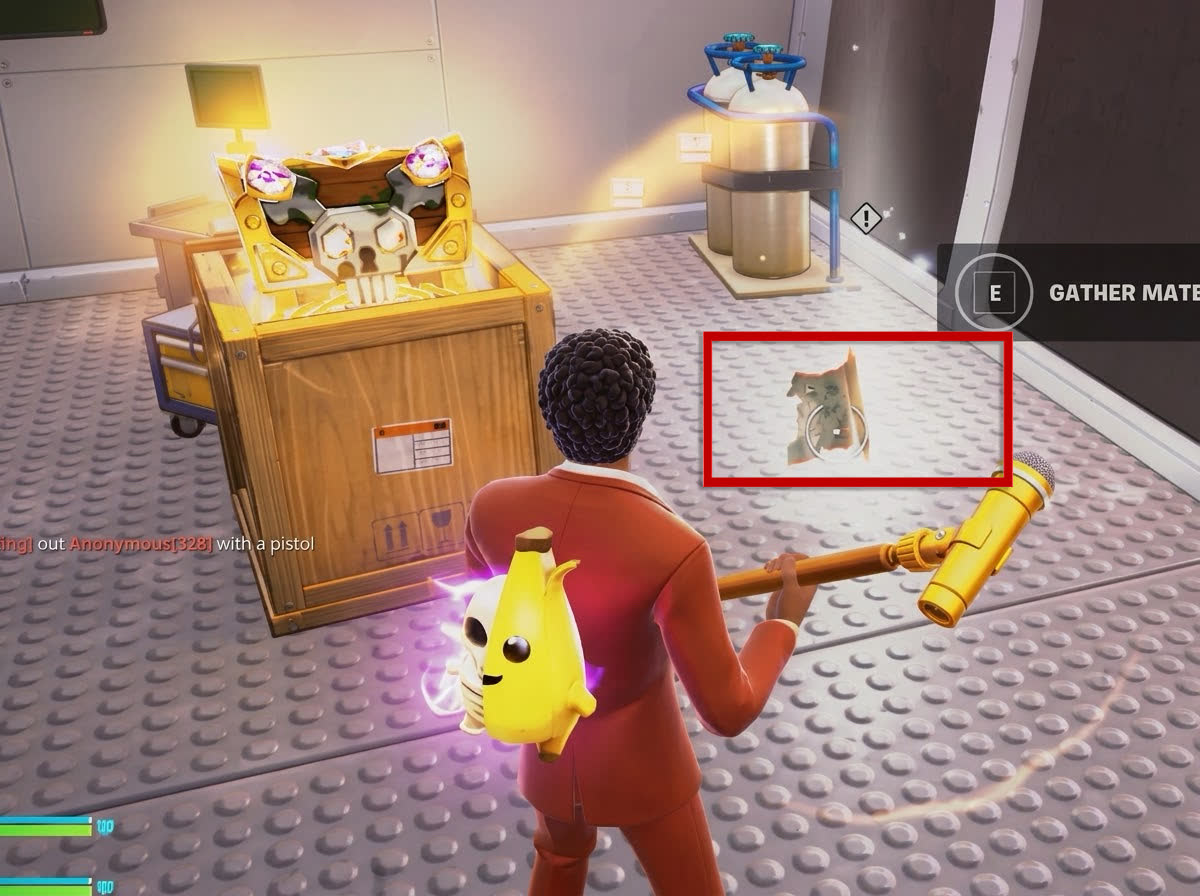
Fragment #1 visual check
At The $.$. Rocky, the fragment is inside the ship on a lower level near the southern end. It is not on the exposed deck or automatically awarded for defeating A$AP Rocky. The strongest final landmarks are the large yellow skull-marked crate, nearby wooden cargo and the gray riveted floor.
What not to assume
- A reported captain location does not confirm the exact pickup room.
- A date in an outside guide does not override Fortnite's live quest timer.
- Defeating a boss is not automatically required; Fragment #1 is a separate floor pickup.
- The browser tracker does not read your Epic account and cannot diagnose missing in-game progress.
When to stop retrying
If the quest is not visible, the fragment is still labeled unconfirmed, or several fresh matches show the same result, wait for an in-game update rather than repeatedly searching a guessed room. The location directory is updated when dependable evidence becomes available.
Fortnite Map Fragment not showing after every check
If the quest is active, the correct room has been verified and a fresh supported match still shows no prompt, stop repeating the same route and document the state. Capture the quest panel, map position and empty interaction point without exposing account information. Note the platform, playlist and approximate time. That evidence helps separate a temporary match problem from an outdated guide.
Do not use the website tracker as a diagnostic signal: it stores only your manual choices in the browser. Resetting it cannot reset Fortnite progress, and marking a fragment collected cannot unlock a reward. If Fortnite already records the piece as complete, the pickup may correctly remain absent. For persistent account-side quest problems, consult Epic Games' official support channels rather than sharing login details with a guide site.
Recheck the live quest after any Fortnite update because availability and interaction behavior can change.